100% Free Forever

Convert Images to WebP in Seconds

The fastest, free WebP converter for Windows. Batch convert PNG, JPG, GIF, BMP, TIFF to WebP with one click. Right-click integration, custom presets, and zero quality loss.

596+
Downloads
4.9★
User Rating
$0
Forever Free
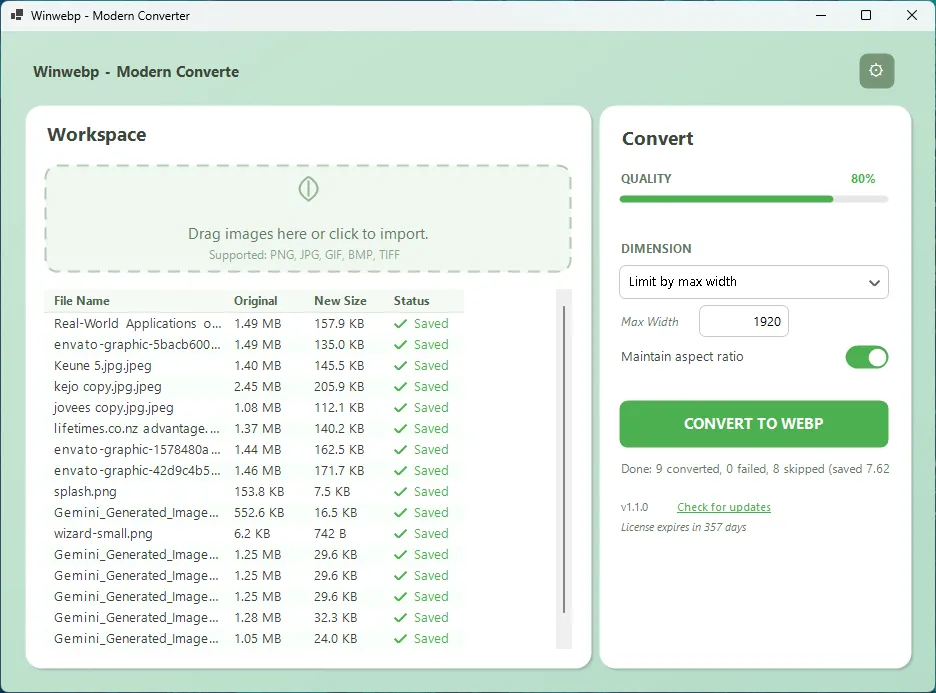
Winwebp - Free WebP Converter for Windows

Everything You Need for Perfect WebP Conversion

Professional-grade image conversion with an interface so simple, anyone can use it.

🖱️

Right-Click Convert

Convert images directly from Windows Explorer. Right-click any image and select "Convert to WebP" — it converts silently in the background with a notification when done.

📦

Batch Processing

Select hundreds of images and convert them all at once. Process entire folders in seconds with consistent quality settings.

🎚️

Quality Control

Fine-tune compression with our quality slider (1-100). Choose lossless mode for pixel-perfect conversions when quality matters most.

📐

Smart Resize

Resize images on-the-fly: by percentage, max dimensions, or exact size. Perfect for creating thumbnails or optimizing for specific platforms.

💾

Custom Presets

Save your favorite settings as presets. One-click access to "Social Media", "Thumbnail", "High Quality" and your own custom configurations.

🖥️

Windows Native

Native app for Windows 10/11 with a beautiful modern interface and powerful features. macOS version coming soon.

Smaller Files. Faster Websites. Better SEO.

WebP delivers superior compression without sacrificing image quality. It's the image format the modern web demands.

PNG vs WebP comparison - same quality, 96% smaller file
Original PNG
2.94 MB
WebP Output
122 KB
96% Smaller

Real conversion result with Winwebp — no visible quality loss

Built for Creators Who Move Fast

Whether you're optimizing a website or posting to Instagram, Winwebp has you covered.

🌐

Web Developers

Boost your Core Web Vitals and PageSpeed scores. WebP images load faster, improving user experience and SEO rankings. Batch convert entire asset folders in seconds.

📱

Social Media Managers

Create platform-optimized images with built-in presets for Instagram, Twitter, Facebook, and LinkedIn. Smaller files = faster uploads and better engagement.

🛒

E-commerce Teams

Optimize thousands of product images without losing quality. Faster-loading product pages mean higher conversion rates and happier customers.

✍️

Bloggers & Content Creators

Stop wasting time with online converters. Drag, drop, done. Get back to creating content instead of waiting for uploads.

Get Winwebp Free — No Catch

No trials. No watermarks. No subscriptions. Just a powerful tool that works.

Windows

v1.1.0 • Windows 10/11

macOS

Coming Soon

Safe & Secure No adware, no bundled software, no data collection. Open source coming soon.

Frequently Asked Questions

Is Winwebp really free?

Yes! Winwebp is 100% free forever. No trials, no watermarks, no hidden fees, no subscriptions. We believe everyone deserves access to professional-grade image optimization tools.

What image formats can Winwebp convert?

Winwebp converts PNG, JPG, JPEG, GIF, BMP, TIFF, and TIF images to WebP format. It supports batch conversion, so you can process hundreds of images at once.

Does Winwebp work offline?

Absolutely! Winwebp is a native desktop application that runs entirely on your computer. No internet connection required after installation.

Will I lose image quality?

You control the quality. Use the quality slider to balance file size and quality, or choose lossless mode for pixel-perfect conversions with no quality loss whatsoever.

How do I use right-click conversion?

After installing Winwebp, open it once and enable "Context Menu Integration" in settings. Then right-click any PNG or JPG file and select "Convert to WebP with Winwebp".

Is WebP supported by all browsers?

WebP is now supported by all major browsers including Chrome, Firefox, Safari, Edge, and Opera. It covers over 97% of global web users.

Can I resize images while converting?

Yes! Winwebp includes powerful resize options: by percentage, max width/height, or exact dimensions. Create thumbnails, social media sizes, or any custom dimensions.

Does Winwebp collect my data?

Never. Winwebp doesn't collect any personal data, doesn't require an account, and doesn't phone home. Your images stay on your computer.

Why do I need to enter my email to download?

We send you a secure, time-limited download link rather than hosting a public file that could be tampered with or abused. This ensures you always get the authentic installer directly from us. If you opt in to the newsletter, we'll only send occasional update notifications — never spam. We never sell or share your email with third parties. No account creation, no passwords — just your email and one click.

Official Web Design Partners

J Web Design Company in Sri Lanka M Web Design Sri Lanka